What each system type costs in Australia (2026)
| System type | Monthly cost | Upfront cost |
|---|---|---|
| Cloud VOIP (Hosted PBX) | $20-35 per user/month | $0-80 per handset |
| On-Premise PBX | $50-100+ per user (support) | $3,000-20,000 hardware |
| ISP Phone Line (ATA port) | $20-40/month flat | $0 (uses NBN modem) |
| Mobile / Softphone only | $15-30 per user/month | $0 |
Cloud VOIP figures assume a standard plan with Australian calls included, as at August 2026. On-premise PBX support and hardware costs vary widely by vendor, system size and support contract, the range above is an indicative planning estimate, not a quoted average, get a specific quote for your business before budgeting. Most Australian small businesses with 1-20 staff are best served by cloud VOIP. Use the comparison below to confirm which type fits your situation, then see our AU provider comparison guide to choose the right plan.
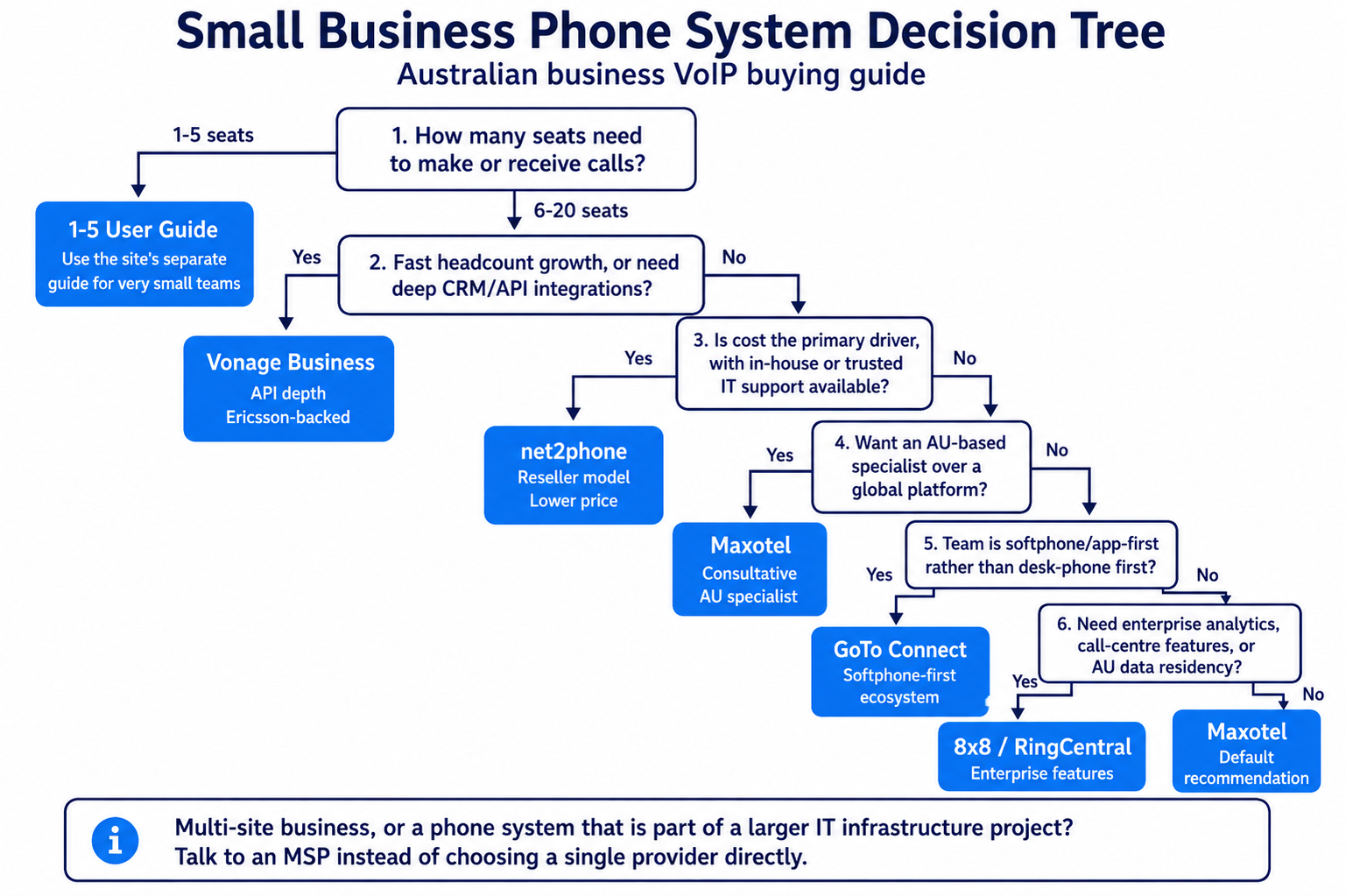
Which Type of Phone System Does Your Business Actually Need?
Phone System Types Compared
| Cloud VOIP (Hosted PBX) | On-Premise PBX | ISP Phone Line (ATA) | Mobile / Softphone | |
|---|---|---|---|---|
| Best for | 1-30 staff, flexible setup | 20+ seats, complex routing | Sole traders, 1-2 lines only | Remote teams, app-first |
| Monthly cost | $20-35 per user/month | $50-100+ per user (support) | $20-40/month flat | $15-30 per user/month |
| Upfront cost | $0 upfront on some bundled/rental plans; outright handsets vary, often exceeding $80 | $3,000-20,000 hardware | $0 (uses existing modem) | $0 |
| 1300/1800 number support | Yes - all providers | Yes (via SIP trunk) | No | Some providers only |
| Number porting | Yes - ACMA-regulated | Yes | Usually available for active local numbers; confirm the gaining telco accepts the port | Some providers only |
| Call recording / IVR | Available from many providers, but plan tier and add-on charges vary | Yes (complex setup) | No | Basic only |
| Ring groups / auto-attendant | Yes - setup in minutes | Yes - requires IT config | No | Limited |
| Scales with your team | Easy - add users online | Complex - hardware limits | No - one line only | Easy - add licences |
| Recommended for AU SMBs | Yes - suits most businesses | Only for 20+ seat operations | No - too limited for business | Only for remote-first teams |
Figures above assume a standard plan with Australian calls included, as at August 2026; check current provider pricing for the exact rate.
How Many Phone Lines Does a Small Office Actually Need?
"Lines" in a cloud phone context means concurrent call channels, how many calls can be in progress simultaneously. This is different from extensions, which identify users, devices or internal destinations and do not necessarily each have a public phone number.
A simple way to think about it: if 3 staff can all be on the phone at the same time, you need 3 concurrent channels. You might have 10 extensions but only 3 active calls at peak. Most cloud phone providers include a reasonable number of concurrent channels in standard plans, but it's worth confirming this number before signing up.
A rough sizing guide:
- 1-3 staff: 2-3 concurrent channels is almost always sufficient
- 4-10 staff: 3-6 channels typically covers peak load
- 10-20 staff: 6-10 channels, depends heavily on call intensity of the role
High-call-volume roles (reception, inbound sales, support) need more channels than low-call-volume roles (developers, back-office staff). Use the Phone System Sizing Wizard to get a tailored recommendation based on your actual team structure.
What Does a Business Phone System Actually Cost in Australia?
Pricing for Australian business phone companies breaks down into three components: the per-seat monthly plan fee, call costs (often included or capped), and optional add-ons like 1300 numbers, call recording, or CRM integrations. Here is what realistic budgeting looks like for a typical small business.For a 3-5 seat business taking mostly inbound calls, expect to pay between $75 and $150 per month all-inclusive at the entry level. That covers your cloud phone system, your phone numbers, voicemail-to-email, ring groups, and basic call routing. It does not cover handsets, which are a separate one-off cost (typically $80-$250 AUD per desk phone, check current prices from AU distributors).For a 10-15 seat operation with higher outbound call volume, a 1300 number, and call recording, realistic monthly spend is $350-$600 per month. Some providers bundle calls; others charge per minute. If your team makes many outbound calls, a bundled plan is almost always better value. If you are mostly inbound, a lower per-seat rate with pay-as-you-go calls can work well.Use each provider's Australian Critical Information Summary or Australian quote rather than converting a US list price, because regional prices and plan inclusions can differ. MaxoTel is Australian-based and prices its public plans in AUD; net2phone is a US-headquartered subsidiary of IDT Corporation.Australian Cloud business phone companies: What the Market Looks Like
Most businesses searching for a phone system will encounter cloud business phone companies as the primary options. The section below gives an overview of the main players in the Australian market, what each one looks like at different price points and with different strengths. This is not a ranked list; the right provider depends on your specific situation. For our current in-depth provider comparisons, see our guide to comparing AU business VOIP providers.
Maxotel
Maxotel is an AU-based business phone company operating as a specialist for the SMB market. Their positioning is consultative, they ask how your business works before recommending a plan, which makes them well-suited to businesses that haven't set up a proper phone system before. MaxoTel lists Everyday PAYG from $9.95 per user/month with a two-user minimum, and its included-calls Outright/BYO plan from $29.95 per user/month, including GST, with month-to-month contracts available. Their local AU support team handles full setup, handset configuration, and number porting, For a 1-10 seat business that wants someone to walk them through the whole process, this is a genuinely strong option. For a guide to compatible desk phones, see our reviews of the Yealink T33G (best value), Yealink T46U (multi-line), and Grandstream GRP2602P (budget Grandstream).
8x8
8x8 is a US-headquartered provider with AU infrastructure and local support. Their platform is mature and full-featured: ring groups, auto-attendant, call queuing, voicemail-to-email, call recording, and an analytics dashboard that goes well beyond what most SMB providers offer. If you need to measure call volume by team, track missed call rates, or generate reports for management, 8x8 handles this well.Current Australian pricing is available by sales quote. One caution: the 8x8 admin interface is comprehensive but not simple. A non-technical business owner setting it up alone will find it more complex than a specialist AU provider. Factor in either IT support or onboarding assistance when budgeting.8x8 lists Australian data-centre infrastructure, but its privacy notice permits international data transfers; customers with data-residency requirements should confirm the location and scope of storage and processing contractually. 8x8 lists full end-user support for Australia; confirm applicable support hours and escalation arrangements in the quote. International calling rates are competitive if your team makes regular calls to the US or UK.RingCentral
RingCentral is one of the largest VOIP and unified communications platforms globally, and they operate in Australia; confirm the location, hours and scope of support included in the order. Their strength is breadth: phone calls, video meetings, team messaging, and fax (yes, still relevant in healthcare and legal) all in one platform. For businesses already invested in Microsoft 365 or Google Workspace, RingCentral integrates cleanly with both.RingCentral’s Australian pricing is provided through its sales process and governed by the customer’s order form. The admin portal is powerful but has a learning curve. For teams of 5-30 seats that have some IT support available or a tech-comfortable admin, RingCentral gives you room to grow without switching providers.The limitation for very small businesses: RingCentral is designed to sell to mid-market buyers. The onboarding experience assumes some technical comfort, and their support model favours self-service documentation over hand-holding. If you want someone to call and walk you through your first ring group setup, Maxotel or net2phone will give you a better experience at the 1-5 seat level.net2phone
net2phone offers Australian number coverage and a channel-partner program, but its public plans do not establish an Australian SMB tier, local-call inclusions or AUD pricing. Australian businesses should confirm availability, inclusions and pricing with an authorised provider.net2phone offers different partner models, so Australian buyers should confirm whether net2phone or the selected partner owns onboarding, billing, frontline support and escalation. If you find a good reseller, it works well. Ask your reseller explicitly: who do you call if the phones go down at 9am on a Monday? Get a direct answer before signing. For fitness-specific phone requirements, see our guide to VOIP phone systems for gyms and fitness studios.net2phone suits businesses that want solid core VOIP features at a lower price point and have someone in-house (or a trusted IT person) who can handle basic troubleshooting without hand-holding. Onboarding and support responsibility depends on the net2phone product and partner arrangement; confirm who provides end-to-end setup before purchasing.GoTo Connect
GoTo Connect (formerly Jive) is built for teams that want softphone-first operation, meaning staff use an app on their computer or mobile rather than a physical desk phone. This suits remote or hybrid teams well, and businesses that have already moved away from physical handsets. GoTo Connect integrates with Microsoft Teams, which makes it a useful bridge for businesses that want Teams for internal communication but need a proper AU phone number and VOIP service for external calls.GoTo's Australian Critical Information Summary lists Basic at $22, Standard at $50, CX at $57 and Teams Edition at $28 per user/month, excluding GST. GoTo Connect documents Australian number options and advertises 24/7 support; confirm where support is delivered from. Their dial plan editor (which controls how calls are routed) is visual and easier to use than most competitors, a genuine usability advantage for non-technical admins setting up call flows.Where GoTo Connect is weaker: if you need physical handsets as the primary device, their ecosystem is slightly less polished than 8x8 or RingCentral. It works fine with Yealink and Grandstream phones, but the setup experience is more hands-on than a managed provider like Maxotel.Vonage Business
Vonage Business (now part of Ericsson) has strong AU presence and a well-regarded API platform (Vonage Communications APIs, formerly Nexmo) for developers. If your business needs custom call routing, click-to-call from a CRM, or programmatic SMS alongside VOIP, Vonage's developer ecosystem is hard to beat.For most small businesses, the API depth is irrelevant. What matters is that Vonage's current Australian list prices are $15 for Lite, $30 for Smart and $40 for Best per user/month, excluding GST. Contract length, renewal terms and any month-to-month price difference should be confirmed in the Australian quote and order terms.Vonage is worth serious consideration if your business is growing quickly and you expect to integrate your phone system with CRM (Salesforce, HubSpot, Zoho) or customer service platforms in the next 12 months. The integration depth is genuinely excellent. If you are a 2-person trade business wanting to take calls more professionally, it's more than you need.What Most Businesses Get Wrong When Choosing a Phone System
Choosing a business phone company is not the same as choosing a phone. Most of the mistakes happen before the first call is made.Mistake 1: Comparing providers on features, not on support model
Every provider in this guide can handle ring groups, voicemail, and auto-attendant. The features are not what separates them for a small business. What separates them is what happens when something breaks, when your number port goes wrong, or when a new staff member needs a phone set up in 30 minutes. A provider with slightly fewer features but genuinely responsive AU support is worth more to a 5-person business than a feature-rich platform with offshore script readers. Ask every provider you shortlist: 'What is your average response time for phone support, and where is that team based?'Mistake 2: Assuming the ISP phone service is a real business VOIP service
Many Australian businesses are still running their phones through the green ATA port on their ISP-supplied modem. An ISP-supplied ATA service is an NBN voice/VoIP service presented through an analog handset port, not a hosted PBX. Features vary by ISP; for example, Telstra Business Voice on NBN supports call waiting and call forwarding but not hosted-PBX features such as ring groups. Switching to a proper business phone company fixes all of this, typically for less than $30 per seat per month. The cost of staying on the ISP ATA, in lost leads and missed calls, is almost certainly higher than the cost of upgrading. See our guide to VOIP vs traditional phone systems for the full breakdown.Mistake 3: Signing a 24-month contract before testing call quality
Call quality on a VOIP service depends partly on the provider and partly on your NBN connection, specifically your upload speed, latency, and jitter. A provider that works perfectly for a business on a Fibre to the Premises (FTTP) connection may have quality issues on an older Fibre to the Node (FTTN) service with marginal upload speeds. Trial availability and minimum contract terms vary by provider; confirm both before signing. Use it. Test with real calls in your real office before committing to a 12 or 24-month contract. If a provider won't let you trial before committing to a long contract, that tells you something.Key Factors When Choosing an Australian Business Phone System
AU number availability and porting
Confirm the provider can supply a geographic number (02, 03, 07, 08) in your area, and that they can port your existing business number. Number porting in Australia generally takes 8-15 business days under ACMA's Local Number Portability Code, though some providers have faster processes. Do not assume the port will be instant, plan for it, and maintain your old service until the port is complete and tested. Losing a business phone number mid-port because the timeline wasn't planned is a common and preventable problem. See our NBN VOIP setup guide for porting steps and what to check with your provider upfront.NBN compatibility and call quality track record
Not all business phone companies handle NBN variability equally well. A provider with AU-based SIP infrastructure (AU data centres, AU peering) will generally deliver lower latency and better jitter performance than a provider routing calls through US or Singapore infrastructure. Ask each provider where their AU SIP servers are located. For businesses on FTTP or HFC, this matters less. Size bandwidth by concurrent calls and codec rather than a fixed 5 Mbps threshold; a common planning allowance is about 90-110 Kbps upload and download per G.711 voice line, plus headroom for other traffic. For a detailed technical breakdown of VOIP call quality factors on NBN, see our VOIP call quality guide.1300 and 1800 number support
If you want a 1300 or 1800 number for your business, confirm your provider can supply and manage it. Not all business phone companies offer this directly, some require a separate number broker. Most of the providers in this guide support 1300 number supply and routing, but pricing and management interfaces vary. For businesses where a 1300 number is part of the brand (tradies, health clinics, professional services), get this confirmed in writing before you commit to a provider. See our 1300 number guide for what to expect on costs and regulations.Contract terms and exit conditions
Australian Consumer Law gives businesses some protection on service contracts, but it does not eliminate lock-in costs on hardware or setup fees. Read the cancellation terms before you sign. Specifically: What is the notice period? Are there early exit fees? What happens to your number if you leave, can you port it to a new provider? A reputable provider will give you straightforward answers to all three. If answers are vague or buried in a 40-page PDS, factor that into your decision. Month-to-month pricing, notice requirements and exit costs vary by provider, plan and any associated hardware agreement.Handset and hardware support
If a role on your team handles a high volume of calls, such as reception or an executive assistant, it's worth looking at a purpose-built option like Yealink's T7 series phones before defaulting to a standard desk handset. The extra line capacity and extension monitoring can matter more than the base phone system choice for that specific desk.
This article is about choosing a provider, not a phone. But the two decisions interact. Some providers ship pre-configured handsets direct to your business, you plug in, you're live. Others provide configuration guides and leave setup to you. For non-technical teams, provider-supplied pre-configured phones save real time. Ask whether handsets are included in the plan or purchased separately, whether the provider will pre-configure them to your account, and whether they support the handset brands you already own. For handset recommendations, see our best SIP desk phone guide.Desk Phones vs Mobiles and Laptops: What Should Your Staff Use?
Modern cloud phone systems support three endpoint types: desk phones (physical handsets on a desk), softphone apps on a mobile, and softphone apps on a desktop or laptop. You can mix all three on the same system.
Desk phones are best for: Reception roles, high-call-volume positions, anyone who needs to transfer calls or manage multiple lines simultaneously, and roles where a physical handset is more ergonomic over a long shift. SIP desk phones have physical buttons, which makes attended transfers and BLF (busy lamp field, seeing which colleagues are on a call) much faster to operate than a software interface.
Mobile apps are best for: Staff who move around the office or between locations, remote workers, and anyone who doesn't need complex call management. The business number appears as caller ID when dialling out. Incoming calls ring on the mobile. Voicemail goes to email. It works.
Desktop apps are best for: Computer-based roles where the headset is already on and the screen is front-and-centre. Works well for sales and support roles who are already at their computer for the duration of the call.
A cost-effective approach for mixed teams: Give desk phones to reception and anyone who manages call flow. Give mobile apps to field staff and remote workers. Give desktop apps to support and sales staff who work at a computer all day. One phone system, three endpoint types, one consistent business number experience for your customers.
Features Every Small Office Needs
Here is an honest breakdown of which features actually matter for a small office, and which ones you can safely ignore.
Features You Almost Certainly Need
- Multiple simultaneous calls (concurrent channels). The ability for two or more staff to be on the phone at the same time. If you only have one channel, the second caller gets a busy signal. Even a 2-person office should have at least 2 concurrent call channels.
- Voicemail to email. Voicemail messages delivered to your inbox as an audio file. Removes the need to dial in and retrieve messages manually.
- After-hours call routing. Automatic routing of calls to voicemail (or a mobile) outside your configured business hours.
- Number porting. The ability to bring your existing phone numbers to the new system. Porting availability depends on the number type, location and whether the gaining telco accepts that port.
- A basic auto-attendant. Even a simple "thanks for calling [business name], please hold while we connect you" message makes a small office sound professional and buys staff time to finish a task before answering.
Features That Are Useful But Situational
- Call recording. Useful for training and potentially required in particular regulated workflows, but recording, notice, consent, retention and access obligations must be assessed for the business and jurisdiction. Not needed for every business.
- 1300 or 1800 numbers. A national presence number can be important for certain businesses (national service, professional services). Add one if it matters to your brand. Not required for a local service business.
- CRM integration. Screen-popping caller details from your CRM when a call comes in. Valuable if you have a CRM and high inbound call volume. Usually an add-on at extra cost.
- Call queuing and hold music. Relevant if callers regularly wait on hold. For a 2-seat office with occasional simultaneous calls, a ring group is sufficient. For a business where callers genuinely queue, a proper queue with hold music matters.
Features Most Small Offices Don't Need
- Advanced contact centre features. Wallboards, live agent monitoring, skills-based routing, and callback scheduling are contact centre tools. A small office of 10 staff does not need a contact centre platform.
- Video conferencing through the phone system. Your team already has a tool for this (Teams, Zoom, Google Meet). Duplicating it through the phone system is usually redundant.
- Enterprise unified communications platforms. Unless your business has significant Microsoft 365 infrastructure and an IT team to manage it, an enterprise UC platform is overhead without return.
AU-Specific Considerations for Your Phone System Choice
The PSTN shutdown and what it means for your provider choice
Australia's copper PSTN network was progressively decommissioned as the NBN rolled out, with the process largely complete by 2025. If your business is still on a legacy copper landline through Telstra, your service may already be on borrowed time. Moving to a business phone company is no longer a tech upgrade for most businesses, it is the default path. The question is which provider to move to, not whether to move. Any provider you choose should have a clear NBN compatibility statement and experience migrating businesses from copper or ISP-ATA setups. For more on the NBN's impact on VOIP, see our NBN VOIP compatibility guide.000 emergency calling on VOIP
Business phone companies in Australia are required to provide access to 000 emergency services, but there are important differences from traditional phone lines. VOIP 000 calls require your service address to be registered with the provider, if you change offices or have mobile users working from different locations, your registered address may not match your actual location in an emergency. Confirm with your provider how they handle 000 registration, particularly for remote workers. This is an ACMA regulatory requirement, and any reputable AU provider will have a documented process for it.Power outages and NBN VOIP
Most NBN-based phone services stop working if the required premises equipment loses power. Traditional corded copper phones could receive network power, but cordless phones still required local power. If your business needs to remain reachable during power outages (medical clinics, emergency services, essential trades), you need a plan. Options include battery backup units for your NBN equipment and router, a mobile number as failover in your VOIP auto-attendant, or a 4G SIM-based backup connection. Ask your business phone company what failover options they support and how quickly your call routing can be switched to a mobile number in an emergency.Number porting timelines under ACMA rules
For a single local number, the LNP Code generally sets completion targets of 80% within 8 business days, 90% within 10 business days and 98% within 15 business days. Once verification and provider processing are factored in, most SMB ports take 8 to 15 business days. Freephone numbers (1800) and local rate numbers (1300) follow a separate transfer process and may take longer. During the port window, both your old and new service may have periods of reduced capability, plan for this, communicate with your team, and keep a mobile number available as a fallback. Never cancel your old service before confirming the port is complete and tested.SIP ALG: the hidden NBN call quality killer
SIP ALG (Application Layer Gateway) is a feature built into many routers and NBN modems that attempts to help VOIP calls pass through NAT, but in practice it causes more problems than it solves. Symptoms include one-way audio (you can hear the caller but they can't hear you), calls dropping after exactly 30 seconds, or registration failures on your VOIP handsets. SIP ALG can cause problems in some deployments, but whether it should be disabled depends on the provider, router and firewall configuration; follow provider and router-vendor guidance. Most business phone companies will tell you to do this as part of setup. If yours doesn't mention it, ask.What Switching to a New Phone System Actually Looks Like
The process of switching to a business phone company is more straightforward than most businesses expect. Here is a realistic sequence for a 1-10 seat business starting from scratch or moving from an ISP ATA setup.Step 1: Shortlist 2-3 providers. Use this guide to identify 2-3 options that fit your size, budget, and support requirements. Contact each one, not just to get a quote, but to assess how they handle the conversation. A good provider asks about your business before pitching a plan. A bad one leads with price.Step 2: Confirm your NBN connection type and upload speed. Most VOIP calls require 100Kbps upload per concurrent call. Check your current upload speed at speedtest.net or fast.com during business hours. Confirm your NBN connection technology (FTTP, HFC, FTTN) with your ISP, this affects what quality you can expect and what router settings may need to change.Step 3: Decide on handsets or softphones. Will your team use physical desk phones, a softphone app on their computer, a mobile app, or a mix? Decide this before selecting a plan, as it affects which features you need and whether you are buying hardware. For physical phones, see our SIP desk phone guide for AU-available options.Step 4: Submit your number port request. If keeping your existing number, submit the port request to your new provider early, before your old service contract ends. Provide the exact account details from your current provider (account number, service address, authorised contact). Discrepancies between the port request and the current provider's records can cause rejection or delay.Step 5: Set up your call routing before go-live. Configure your auto-attendant, ring groups, after-hours voicemail, and any other call routing before the number port completes. Test with internal calls first, then with calls from a mobile. Do not go live until you have heard the call routing working correctly end-to-end.Step 6: Go live on the ported number. Once the port is confirmed, test an inbound call from an external number. Confirm with the provider-without placing a test call to 000-that emergency calling is enabled and that the service address held for the number is correct. Confirm voicemail-to-email is delivering. Check your provider's router guidance before changing SIP ALG settings.An individual local-number port generally takes 8-15 business days, while more complex ports can take up to 30 business days; allow additional time where hardware delivery, configuration or testing is required. A specialist business phone company should guide you through each step. If you are doing this alone without provider support, our NBN VOIP setup guide covers the technical steps in detail.Specialist Provider vs MSP: Which Do You Actually Need?
You will sometimes hear that you should go through a Managed Service Provider (MSP) for your phone system rather than directly to a business phone company. MSPs have a legitimate role, but it is not the 1-10 seat business doing basic inbound and outbound calls.An MSP makes sense when your phone system is one part of a larger IT infrastructure project: multi-site rollout, complex Active Directory integration, custom SIP trunk configuration across multiple locations, or a team that genuinely cannot manage any IT internally. In those cases, an MSP's ability to manage the whole stack has real value.For the 1-10 seat business that wants to take calls more professionally, a specialist business phone company like Maxotel handles the entire process end-to-end, provisioning, porting, handset configuration, call routing setup, without an MSP in the middle. Adding an MSP layer adds cost and a second point of contact for support. For most SMBs, it is not necessary.If you are unsure, ask the MSP or provider directly: 'What specifically would an MSP handle that you wouldn't?' A good specialist business phone company should be able to answer that honestly. If the answer is 'nothing in your case', go direct.Your Next Steps Before Choosing a Phone System
Before you contact any provider, work through this checklist. It takes about 15 minutes and will make every provider conversation significantly more productive.1. Count your seats. How many people in your business need to make or receive calls? Include reception, back office staff who occasionally take calls, and remote workers. This is your seat count.2. Count your concurrent call paths. At your busiest time, how many calls could realistically be happening simultaneously? A 5-person business where only 2 people are ever on the phone at once does not need 5 lines. This number drives plan sizing.3. Note your current phone number(s). Write down every business number you want to keep. Confirm which provider currently holds each number, you will need this for port requests.4. Check your upload speed. Run a speed test from your business internet connection during business hours. Note the upload speed. Assess available bandwidth per concurrent call and test latency, jitter, packet loss and congestion; a universal 5 Mbps cutoff is not established.5. List your must-have features. Ring groups? After-hours voicemail? 1300 number? Call recording? Voicemail-to-email? CRM integration? Rank them as essential, nice-to-have, and not needed. This prevents upselling into features you will not use.6. Set your budget. Know your maximum monthly spend before any conversation. Include handsets if you need to buy new ones (budget $80-$250 AUD per desk phone).With that information in hand, use our Get a Recommendation form to tell us what you need. The Need to Know Comms Team will point you to the most suitable provider for your specific situation, no sales pitch, no provider relationship that biases the recommendation.Decided cloud VOIP is right for your business? The next step is comparing specific providers on AU-relevant criteria: number porting quality, NBN call quality track record, AU support availability, and pricing transparency. See our guide to comparing AU business VOIP providers for the criteria to check, with AU-specific detail.
For most Australian small businesses, the recommendation is a hosted cloud PBX. If you are ready to move forward with that decision, our guide to the best cloud phone system companies in Australia gives you a framework for evaluating providers and asking the right questions before you commit.
Franchise operators evaluating phone systems face a more complex decision than a single-site business. Each location has its own requirements, but the whole network needs consistency. Our guide to VOIP for franchise businesses in Australia walks through the models that scale across locations without requiring individual IT management at each site.
One question worth asking before you commit to any cloud phone provider is what happens to your numbers and call history if that provider closes. Our guide to what happens if your VoIP provider goes bust in Australia covers number porting rights, data recovery, contract obligations, and what protections exist under Australian telecommunications law.
If you are starting from scratch and not sure whether a full phone system is what your business actually needs, see Do I Need a Phone System or Just a VOIP Line? first. For one to two staff, a basic VOIP line is often the right answer, and it costs a fraction of a hosted system.
If your team has 1 to 5 people and you want a direct recommendation on which specific setup -- solo operator, 2-3 person team, or 4-5 person team -- suits your scale and budget, see our guide to the best phone system for 1-5 users in Australia.
What is the difference between a business phone company and a phone system?
Can I keep my existing business phone number if I switch business phone companies?
How much does VOIP cost per month for a small business in Australia?
Is Maxotel a good business phone company for small business?
What business phone company works best on Australian NBN?
Do I need an IT person to set up a business phone company?
What happens to my VOIP if the power goes out?
What is the difference between a business phone company and an ISP phone service?
How many phone lines does a small office of 5 staff need?
The answer depends on how many calls happen simultaneously, not how many staff you have. For five staff, size channels from expected peak simultaneous calls; the requirement may be lower or higher depending on actual call patterns and roles. If your office has a high-volume reception role or runs an inbound-heavy operation, you may need more. Use the Phone System Sizing Wizard to get a recommendation based on your actual call patterns.
Can I use my existing desk phones with a new cloud phone system?
It depends on your existing phones. If you have SIP-compatible desk phones (Yealink, Grandstream, Polycom, Cisco SPA series), they can often be reconfigured to register with a new cloud provider, check with the provider for compatibility and whether they will assist with reconfiguration. Analogue handsets cannot register directly with a cloud phone system, but some can be retained through a provider-supported ATA; otherwise use compatible SIP handsets or softphone apps.
How long does it take to set up a cloud phone system for a small office?
Basic configuration may be completed quickly, but timing varies with provider workload, call-flow complexity, hardware and customer readiness. The limiting factor is number porting: transferring an individual geographic number from your current carrier generally takes 8 to 15 business days, while a complex port may take up to 30 business days. During that time, your existing service continues to work. The practical timeline from decision to fully live on the new system is 2-3 weeks. New-number services may be activated faster than ported-number services, but confirm the provider's activation, verification, hardware and configuration timeframe.
Are cloud phone systems secure?
Signalling and media-encryption availability varies by provider, endpoint and call path; confirm whether TLS and SRTP are supported and enabled for the proposed deployment. The main security considerations are: choosing a provider with a clear security policy and encrypted transport, ensuring your office network is secure (particularly relevant if you're using the same network for phones and computers), and keeping firmware on desk phones updated. Cloud and on-premise security depend on the specific controls, configuration, endpoints, network design and maintenance practices; compare documented safeguards for each proposed deployment.
Try our free tools
Get specific numbers for your business with our VOIP Cost Calculator and Phone System Sizing Wizard.
Related reading:
Not Sure Which Phone System Type Is Right for Your Business?
Get a Recommendation