Top DECT Cordless Phone Picks for Business
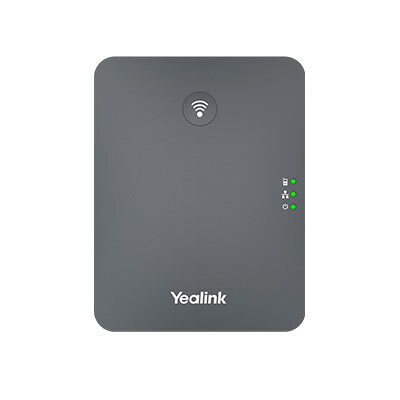
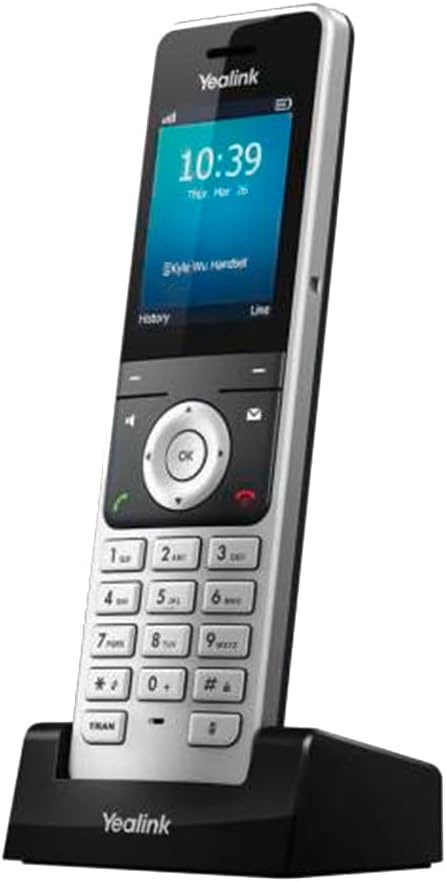
| Yealink W78H + W70B base | Yealink W73H + W70B base | Grandstream DP730 + DP752 base | Grandstream DP722 + DP752 base | Snom M65 (End of Sale; residual stock only) + M900 base | Poly (Plantronics) CS540 DECT headset system | |
|---|---|---|---|---|---|---|
| Type | IP DECT | IP DECT | IP DECT | IP DECT | IP DECT | DECT headset system for a desk phone (RJ-11 telephone interface) |
| Max Handsets | 10 per base | 10 per base | 5 per base (10 per DP755) | 5 per base | 8 per base | 1 per base |
| Range (outdoor) | Up to 300m | Up to 300m | Up to 300m | Up to 300m | Up to 300m | Up to 120m |
| Battery Life | 30h talk / 400h standby | 30h talk / 400h standby | 20h talk / 250h standby | 20h talk / 250h standby | 18h talk / 200h standby | 7h talk |
| Best For | SMB with cloud phone system, 1-5 handsets | Entry DECT with colour screen, SMB | Multi-handset office, higher density | Budget entry DECT, small team | European-quality mid-range, 3-8 users | Single-user wireless headset at desk |
| Est. Price (AUD) | ~$190-225 handset + ~$110-125 base | ~$120-160 handset + ~$110-125 base | ~$180-185 handset + ~$112 base | ~$88-99 handset + ~$112 base | Current Australian listings checked in 2026 were approximately $258-$311 AUD for the M65 handset and $649-$749 AUD for the M900 base; verify live pricing and stock before publication. | ~$250-320 system |
Veterinary clinics are one of the most demanding DECT environments, staff move between reception, consult rooms, treatment areas, and kennels, often while unable to hold a handset. See our full guide to VOIP phone systems for vet clinics in Australia for area-by-area hardware recommendations and multi-cell DECT deployment guidance.
For businesses that need a full multi-handset DECT deployment, including multi-cell coverage across larger or multi-room premises, the Yealink W76P is the strongest current option available in Australia. It supports up to 10 SIP accounts and up to 20 simultaneous calls, with the option to add repeater units for extended range. See our full review for Australian pricing and configuration guidance.
What DECT Cordless Phones Actually Cost in Australia
IP DECT systems for business are sold as a handset-plus-base-station combination. The base station connects to your network and registers with your cloud phone system or on-premise phone system. Additional handsets pair to the same base. Current Australian advertised prices for mainstream one-handset Yealink IP DECT kits are approximately $189-$239 AUD, although prices and stock vary by model and reseller. Additional handsets are sold separately, and pricing varies by model and reseller; check live Australian pricing for the exact handset. Yealink's W80 multicell system uses a W80DM DECT Manager with W80B base stations. Grandstream's DP755 is a single base; Grandstream documents the DP760 repeater for extending its DECT coverage.Consumer DECT phones (Panasonic, Uniden, Oricom sold at JB Hi-Fi and Officeworks) typically run $80-250 AUD for a base plus two to four handsets. These connect to an analog phone port, either the green port on your ISP modem or an ATA adapter, not to a SIP-based phone system. They are cheap but they are not business VOIP phones and do not register with a cloud phone system. The distinction matters enormously, which is why this guide covers both the hardware decision and the underlying service decision.What Is a DECT Phone and Why Do Businesses Use Them?
DECT (Digital Enhanced Cordless Telecommunications) is a widely used cordless-phone radio standard, including in Australia and Europe. It operates in the 1.9 GHz frequency band in Australia, which keeps it clear of Wi-Fi (2.4 GHz and 5 GHz) and reduces interference in busy office environments. DECT uses digital encryption between the handset and base station, providing better security and audio quality than older analog cordless standards.Businesses use DECT phones where staff need to move around while on a call: warehouse floors, retail spaces, medical practices where clinicians move between rooms, workshops, and small offices where a fixed desk phone does not suit every role. An IP DECT system connected to a compatible PBX can provide portable access to supported features such as hold, transfer, call waiting and voicemail.IP DECT vs Analog DECT: The Decision That Actually Matters
This is the most important technical distinction for any business buyer, and it is the one most often missed. The two types of DECT system connect to your phone service in completely different ways and have fundamentally different capabilities.Analog DECT (Consumer-Grade): What It Is and What It Cannot Do
Consumer DECT phones connect to a standard analog telephone line via an RJ11 connector. In the context of modern Australian offices, that RJ11 line comes from one of two sources: the green phone port on your ISP-supplied modem (an ATA adapter built into the modem firmware) or a standalone ATA device connected to your router. Either way, the phone connects to a traditional phone line signal. It does not speak SIP. It cannot register with a cloud phone system. An analog DECT phone does not itself register via SIP, but when connected through a compatible SIP ATA it can operate as an analog endpoint on an IP PBX; available PBX features depend on the ATA, service and PBX configuration.IP DECT (Business-Grade): How It Actually Works
IP DECT phones connect their base station to your office network via an Ethernet (RJ45) cable. The base station registers directly with your cloud phone system or on-premise phone system as a SIP endpoint, exactly the same as a wired SIP desk phone. Handsets then pair wirelessly to the base station using the DECT radio standard. The result is a cordless phone that has all the features of your business phone system: extensions, ring groups, hold, transfer, call recording, voicemail-to-email, and so on.IP DECT base stations are configured the same way as any SIP desk phone: you enter SIP account credentials (from your cloud phone system company) into the base station's web interface, or use auto-provisioning if your provider supports it. Yealink and Grandstream provide automated-provisioning mechanisms, but support for each DECT base model varies by Australian cloud-phone provider and must be confirmed with that provider.Base Station Requirements: What You Need Before Buying Handsets
Every IP DECT handset requires a compatible DECT base station on your network. Handsets do not connect directly to your router or phone system, they pair to the base station, and the base station talks to your VOIP system. This means for every set of handsets you deploy, you need at least one compatible base station on your LAN.Base station capacity varies by model. The Yealink W70B supports up to ten registered DECT handsets or headsets, ten SIP accounts and twenty simultaneous calls. The Grandstream DP752 supports five handsets and five concurrent calls. The Grandstream DP755 supports ten registered handsets and up to sixteen simultaneous calls across up to eight active handsets, limited to two calls per handset. For larger deployments, Yealink's W80B multi-cell DECT Manager system allows multiple base stations to be managed together with handset roaming across the coverage area.DECT Range: What the Specs Mean in Practice
DECT manufacturers typically quote outdoor open-area range of up to 300 metres. Indoor range through walls and floors is always significantly lower, Manufacturers generally specify up to 50 metres indoors under ideal conditions. Actual indoor range depends on walls, floors, interference and base placement, so larger or complex premises require a site survey or coverage test. The DECT 6.0 standard (used in North America) and the European/Australian DECT standard use different frequencies but both deliver similar real-world indoor ranges.For multi-storey buildings or large floor plates, a multi-cell DECT deployment (multiple base stations configured to work together) is the correct solution. Yealink's W80B system and similar enterprise DECT solutions allow seamless handset roaming between base stations, so a user walking from one end of a warehouse to the other stays on the call without dropping.Battery Life: What to Expect
Business-grade IP DECT handsets typically offer 15-30 hours of talk time and 200-400 hours of standby. The Yealink W78H claims up to 21 hours talk time, while the W73H claims up to 35 hours, which means a handset could, in theory, be in active use all day without recharging. Actual time between charges depends on call volume, signal conditions, settings, battery age and whether the handset is returned to its charging cradle.The Grandstream DP722 offers up to 20 hours talk time and 250 hours standby; the DP730 offers up to 40 hours talk time and 500 hours standby; both are more than adequate for most business use. The difference in battery life between Yealink and Grandstream DECT handsets is unlikely to be a deciding factor for most buyers. What matters more is whether the handset supports the DECT base station you are deploying and whether it integrates with your cloud phone system's provisioning system.Multi-Handset Pairing: How Many Can You Connect?
Each DECT base station supports a fixed maximum number of registered handsets and simultaneous calls. These two numbers are different and both matter. You might have five registered handsets but the base station only supports four simultaneous calls, meaning if all five users try to call at once, one call will fail. Match your base station capacity to your actual simultaneous call volume, not just your headset count.For a small business with five staff where two or three might be on calls simultaneously, a single Yealink W70B base station with W73H or W78H handsets is sufficient. A single W70B is rated for up to 20 simultaneous calls overall, so five staff making one call each do not exceed its stated base capacity. Check SIP-account, per-handset and provider limits before selecting a larger system.Yealink DECT Range: W73H and W78H
Strong SMB mobility, practical calling features and a mature DECT platform make the W78H highly relevant, although stationary or mobile-app-first offices benefit less.
Common SIP and 3CX provisioning are well supported, but the separate base, handset registration and occasional SBC requirements add meaningful setup and migration effort.
An intuitive conventional handset, strong battery specification and familiar call controls favour adoption, while limited independent usability evidence and administrator-led provisioning prevent top marks.
Published Australian pricing and easy online procurement are strengths, with sensible ten-handset scaling; ROI is credible but not independently quantified for typical small businesses.
Modern encryption, current security policies and Australian reseller pathways support trust, though Yealink-only DECT compatibility, sparse reputation evidence and unclear handset-specific update longevity remain caveats.
What to know before buying
A publicly accessible, product-specific W78H Australian RCM declaration was not found during this assessment, although the handset is sold through Australian channels and no evidence of noncompliance was found.
Organisations with formal procurement controls may require documentary proof of Australian regulatory compliance rather than relying on local retail availability.
Manufacturer support is principally ticket- and channel-partner-led; a dedicated Yealink Australia end-user telephone support line was not verified. Australian resellers can provide local warranty handling.
Businesses that require immediate phone-based escalation may depend on their reseller or managed-service provider rather than contacting a local manufacturer desk directly.
Yealink's published standard warranty for DECT phones is 12 months, claims normally begin with the point of purchase, and customer-replaceable batteries are excluded except when defective on arrival. Australian consumer-law rights may apply independently.
Battery wear or failure after the first year may require a separately purchased replacement, and warranty experience depends partly on reseller quality.
Yealink publishes security and vulnerability policies and the platform supports OTA firmware updates, but no model-specific minimum support period or W78H firmware-release cadence was located.
Without a defined support horizon, buyers cannot precisely plan how long security fixes will continue for a fleet.
Grandstream DP Series: DP722 and DP730
The DP722 directly addresses mobile calling in small workplaces with highly relevant features, although its single-vendor DECT ecosystem is less flexible than open multi-cell alternatives.
Pairing and Australian SIP-provider setup are manageable, but cross-vendor migration remains manual and official guides lag the presently published firmware branch.
Familiar controls, strong battery life and favourable exact-product reviews support everyday adoption, while the small display and uncertain vendor-support responsiveness temper the result.
Transparent Australian street pricing and broad self-service availability make procurement attractive, with low expansion costs, although quantified DP722-specific return-on-investment evidence is absent.
Current firmware, encrypted SIP/DECT options and open-SIP service portability are reassuring; reseller-led warranty, proprietary base compatibility and lifecycle-documentation gaps remain caveats.
What to know before buying
Typical single-site SMB: Recommended. Regulated or Australian-data-residency environments: further assessment required before enabling GDMS or standardising on DP722; obtain written security-lifecycle, compliance and hosting assurances.
Grandstream's live compliance table did not expose a DP722-specific Australian defined-support-period or RCM/ACMA document, although European/FCC declarations exist and the handset is widely sold through Australian ICT channels.
Australian importers and businesses with formal procurement controls may require model-specific evidence that the supplied unit carries the appropriate RCM compliance marking.
Grandstream publishes global helpdesk and Asia-Pacific contacts but no dedicated Australian manufacturer support telephone line or public end-user response SLA; local assistance is principally reseller or service-provider led.
Direct manufacturer escalation may not match Australian business hours or urgent phone-based workflows if the reseller cannot resolve an issue.
Grandstream's manufacturer warranty runs to certified partners, not directly to end users, and DP7xx purchases through prohibited online marketplaces may not receive manufacturer warranty coverage. Australian retailers commonly advertise a 12-month pathway.
The practical replacement experience depends on the seller's authorisation, warranty process and continued availability rather than a direct Grandstream end-user RMA.
Grandstream's compliance table lists the DP722 defined support period for Australia as 31 March 2029 or later.
Without a committed support date, organisations cannot map the handset cleanly into mandatory vulnerability-management and hardware-refresh schedules.
Optional GDMS management can collect device identifiers, registration and call status, network-quality information and, with permission, packet captures. Grandstream documents US and EU GDMS regions but no Australian data-residency option was found.
Using GDMS may place operational or diagnostic information outside Australia and create an additional cloud processor that must be assessed; local base management does not require GDMS.
Strong business-mobility features, mature DECT technology and excellent SMB alignment outweigh the absence of evidence quantifying how widespread the underlying Australian problem is.
Pairing and Grandstream provisioning can be straightforward, but a separate base, SIP configuration, limited Teams alignment and unguided cross-vendor migration add administration effort.
Familiar handset controls, excellent stated battery life and comprehensive self-help aid adoption, although independent usability evidence and documented support-response commitments remain limited.
Clear Australian prices and readily orderable stock support procurement value, while unmeasured productivity savings and incomplete whole-system scaling costs temper the commercial case.
Active firmware, encrypted DECT, open SIP and Australian resellers support trust, while sparse product-line reputation evidence, base-station dependence and partner-led warranty escalation remain caveats.
What to know before buying
Typical single-site SMB: Recommended. Sites requiring after-hours phone escalation: Recommended with caveats-secure a reseller SLA and spares plan. Marketplace or grey-import buyers: use an authorised Australian channel or treat the warranty pathway as materially weaker.
Grandstream lists the DP730 in its compliance register with an Australian defined-support period through 2029-03-31, but a separately identifiable model-specific RCM/ACMA declaration was not located during this assessment.
Compliance-audited organisations or businesses importing hardware independently may need documentary proof of Australian regulatory conformity rather than relying on a general vendor register or retailer listing.
Local reseller phone and warranty assistance is available, but Grandstream's direct technical-support pathway is a global account-based helpdesk and no Australian after-hours response SLA was found.
A failed base or registration problem outside reseller business hours could leave a voice-dependent site without immediate telephone escalation.
Grandstream's manufacturer warranty runs to certified partners; end users must claim through their seller, and Grandstream warns that DP7xx purchases through prohibited online marketplaces may not receive manufacturer coverage.
A cheap marketplace purchase can leave the buyer dependent on the marketplace seller rather than an established Australian RMA pathway.
Snom and Poly DECT Options
Snom is a German manufacturer with a strong reputation in the European market, increasingly available through Australian distributors. The Snom M-series (M65 handset, M900 base) targets the business market with emphasis on audio quality and build durability. A single-cell M900 can register up to 30 users and supports up to 10 narrowband or 5 wideband calls; in multicell operation, each base supports up to 8 narrowband or 4 wideband calls. Snom DECT pricing is marginally higher than Yealink and Grandstream equivalents but offers a robust alternative if preferred by your provider or IT team.Poly produces DECT headset systems such as the CS540, while its Voyager ranges are primarily Bluetooth headsets. rather than full DECT phone systems. Depending on the model, these wireless headsets connect to a desk phone, a PC, or multiple device types and allow movement within their rated range. They are not IP DECT systems, they do not register with a cloud phone system independently, but they are a legitimate use case for staff who want wireless freedom at a single workstation. If you need a standalone DECT handset that replaces a desk phone, look at Yealink or Grandstream instead.What Most Businesses Get Wrong When Buying DECT Phones
Avoiding three common mistakes can help Australian SMBs make better-informed DECT purchasing decisions.Mistake 1: Buying DECT Handsets Without a Compatible Phone System in Place
IP DECT handsets are handsets. They are the last step, not the first. A Yealink W78H sitting in a box without a SIP account to register to is useless. Before you order a single handset, you need: a cloud phone system company (who gives you SIP credentials and supports Yealink or Grandstream provisioning), a phone system plan, and ideally a test desk phone working on your service. Then you add DECT handsets. Buying handsets first and figuring out the service second almost always results in compatibility problems, configuration friction, or discovering that your ISP's bundled VOIP service does not support SIP registration at all.See our guide to choosing a VOIP phone system for small business and use the Phone System Sizing Wizard to confirm what you need before buying hardware.Mistake 2: Confusing the ISP ATA Port With a VOIP-Capable Port
The green phone port on your NBN modem is an analog telephone adapter (ATA) port. It converts your ISP's cloud phone system service into an analog signal for a standard telephone. It looks like a phone port. It acts like a phone port. But if you plug a DECT base station's Ethernet cable into your router and try to register it with the service behind that green port, it will not work. Those are two completely different systems.This is the single biggest source of confusion for DECT buyers in Australia. ISP policy varies: some providers lock SIP credentials to supplied equipment, while others, including Aussie Broadband, provide credentials and BYO VoIP settings. Whether an ISP supplies usable SIP credentials varies by provider; confirm its BYO VoIP-device policy before purchasing an IP DECT system. You need a compatible SIP service that supplies usable credentials. This may be a business VoIP provider or an ISP voice service that permits BYO SIP devices; advanced PBX features require a suitably capable service.Mistake 3: Undersizing Base Station Capacity
A base station that supports five registered handsets but only four simultaneous calls cannot support all five staff on calls at once; the additional call may fail or be rejected. This is rare but predictable in a busy service environment, reception desk, or a medical practice where multiple clinicians take calls simultaneously. Before purchasing, calculate your peak simultaneous call requirement, not just your headset count, and choose a base station with adequate capacity, or deploy two base stations if needed.Australian Considerations for DECT Deployment
NBN and VOIP Call Quality
DECT phones on an IP DECT system are only as good as the underlying VOIP call quality. If your NBN connection has high jitter or packet loss, call quality will suffer on DECT handsets exactly as it would on a wired SIP desk phone. Before deploying IP DECT, confirm your internet connection meets the requirements for your expected call volume. As a baseline, each simultaneous VOIP call requires approximately 100 Kbps upload and download bandwidth using the G.711 codec. Four simultaneous calls need roughly 400 Kbps dedicated bandwidth, easily achievable on most NBN plans, but worth confirming.Use the VOIP Cost Calculator to check bandwidth requirements for your team size, and review our VOIP call quality guide for NBN-specific optimisation steps including SIP ALG disabling and QoS configuration.PSTN Shutdown and Analog DECT
Legacy copper disconnection was progressive by area and began well before 2022; most mandatory disconnections in the NBN fixed-line footprint were complete by June 2023, with exceptions including Fixed Wireless and Sky Muster areas and some special or business services. In affected fixed-line areas, legacy copper services were generally disconnected or migrated; Fixed Wireless, Sky Muster and certain special or business services are exceptions, and the replacement voice arrangement depends on the provider. Confirm with your provider which voice service is active and which PBX, multi-call and routing features it supports.Number Porting and DECT Deployment
When switching from an ISP voice service to a dedicated business phone company, you will likely want to port your existing number. Australian number porting generally takes 8-15 business days for standard geographic numbers under ACMA's Local Number Portability Code, and 1300 or 1800 numbers follow the separate Inbound Number Portability process. During the porting window, your existing number stays active on the old service. Plan your DECT deployment timeline to align with the port completion, configure and test your IP DECT system on a temporary number first, then the ported number takes over automatically once the port completes. See our PBX guide for more on how number porting works with hosted phone systems.Power Outage Considerations
IP DECT base stations require power and a working internet connection to operate. Unlike a traditional PSTN phone, an IP DECT handset will not work during a power outage unless your network equipment (router, switch) is on an uninterruptible power supply (UPS). This is worth factoring into deployment planning for businesses where call availability during outages is critical, medical practices, emergency service adjacent businesses, and similar. For emergency-call backup, keep a charged mobile phone available. An analog phone on an ISP ATA works during an outage only if all required connection equipment, including the ATA or modem, has functioning backup power; limited FTTP battery-backup arrangements may also require a non-powered corded handset.Choosing the Right Provider Before You Buy Handsets
The single most important step before purchasing any DECT hardware is confirming your cloud phone system company supports the model you are considering. Auto-provisioning, where the provider sends configuration to the phone automatically when it comes online, dramatically reduces setup friction and support calls. Auto-provisioning support for the W70B and its handsets varies by provider, firmware and purchase channel; confirm the exact base model with the provider before ordering. Grandstream is well supported but coverage varies by provider.Contact your provider before ordering hardware. Ask specifically: does your provisioning system support Yealink W70B (or your chosen base station model)? Can you pre-configure the handset for me? What SIP credentials do I need to enter manually if auto-provisioning is not available? The answers will shape your hardware choice more than any spec sheet.If you do not yet have a cloud phone system company, read our comparison of cloud phone system versus on-premise PBX and our overview of the best VOIP phone systems for Australian small business. Choosing the right service first will determine which handsets make sense.Setting Up an IP DECT System: What the Process Looks Like
For a business deploying IP DECT handsets with a cloud phone system company, the setup process has five steps.Step 1: Confirm your cloud phone system company supports your chosen DECT base station model and can provide SIP credentials (or a provisioning URL if auto-provisioning is available).Step 2: Connect the DECT base station to your office network via Ethernet. Position it centrally for the coverage area you need. If using PoE, your switch powers the base station automatically. If not, connect the optional power adapter.Step 3: Register the base station with your cloud phone system. If your provider supports auto-provisioning (Yealink DECT is widely supported), this is as simple as entering the provisioning server URL into the base station's web interface. If configuring manually, enter the SIP server address, SIP username, and SIP password as provided by your cloud phone system company.Step 4: Pair handsets to the base station. Each handset is paired via the base station's registration mode. On the Yealink W70B, this involves pressing the FIND/INTERCOM button on the base to enter registration mode, then navigating to the registration menu on the handset. Step 5: Test calls, both inbound and outbound. Confirm call quality, hold and transfer functions, and that voicemail works correctly. Walk the coverage area to confirm range is adequate for your building.Setup time for a single-base, three-handset deployment varies with provisioning, firmware, network and provider requirements. Most cloud phone system companies offer guided setup support, Maxotel, for example, provides configuration assistance as part of their onboarding, so you do not need to have IT expertise to get a DECT system running.When DECT Is the Right Choice (and When It Is Not)
DECT phones are the right choice when staff genuinely need to be mobile while on calls. Warehouses, retail floors, clinics, workshops, and small offices where the same person covers reception and walks to other rooms are all good use cases. The wireless range, battery life, and call quality of a modern IP DECT system is excellent for these environments.DECT phones are not the right choice when the user sits at a fixed desk all day. Depending on the models compared, a wired SIP desk phone from ranges such as the Yealink T-series or Grandstream GXP-series may offer a larger screen and more programmable buttons than a DECT handset. See our comparison of the best SIP desk phones for Australian business for desk phone recommendations.DECT phones are also not a substitute for a proper VOIP setup. The available line count, PBX features and scaling options are determined by the ISP voice service, ATA and PBX configuration, not by the analog DECT handset alone. If your business needs hold music, call queuing, after-hours routing, or multiple simultaneous calls, start with a cloud phone system company and then add IP DECT handsets. The phone comes last.Your Next Steps
Before you buy any DECT hardware, work through this checklist:1. Confirm you have (or are getting) a cloud phone system or on-premise phone system with SIP credentials. If you are currently using the green port on your ISP modem, you need to address this first. Visit Get a Recommendation to discuss options.2. Confirm your cloud phone system company supports your chosen DECT base station model and can assist with provisioning or configuration.3. Calculate your peak simultaneous call requirement (not just your headset count) and choose a base station with adequate capacity.4. Check the coverage area you need. For a suitably sized open-plan office, one base station may be enough, but coverage should be confirmed with a site test. For a multi-storey building or large warehouse, plan a multi-cell deployment.5. Decide whether you need Bluetooth headset flexibility (Yealink W78H adds Bluetooth for headset pairing) or whether the standard W73H meets your needs.6. Use the Phone System Sizing Wizard to cross-check your seat count and call volume against the right system configuration before ordering anything.7. Order a base station and a single handset first. Test fully before ordering additional handsets.DECT cordless phones are a common choice in hospitality for housekeeping and floor staff who move around the building. For the full context on phone system setup in hospitality environments, see VOIP for Hospitality Australia.
DECT handsets add a base station to the compatibility equation, not all business phone companies support DECT base station SIP registration directly. Our Phone Compatibility Checker covers major DECT models and assesses their compatibility with your VoIP platform.
Can I use a DECT phone with my ISP's NBN voice service?
How many handsets can I pair to one DECT base station?
Do IP DECT phones work with all cloud phone system companies?
What is the range of a business DECT phone?
How long does the battery last on a business DECT handset?
Do I need a separate phone line for each DECT handset?
Is a DECT phone better than a Wi-Fi softphone for mobile staff?
Try our free tools
Get specific numbers for your business with our VOIP Cost Calculator and Phone System Sizing Wizard.
Related reading:
- best desk phones
- VoIP for tradies
- VoIP costs
- Browse Yealink cordless and desk phones available from Digiphone.
Not Sure Which DECT System Fits Your Setup?
Get a Recommendation